The United States Citizenship and Immigration Services or USCIS is in charge of administering immigration services and benefits for those who are seeking to enter to stay in the United States. There is an online portal offered by this government agency. In the portal, you can create accounts to manage your immigration-related applications.
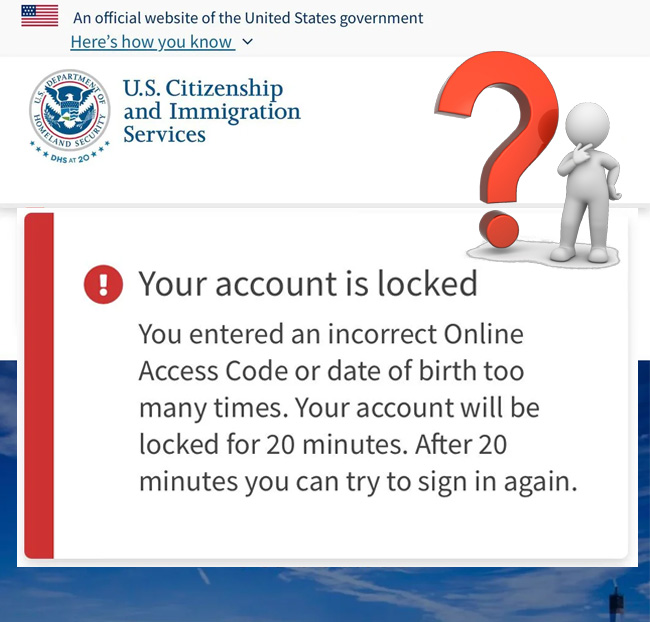
Talking about USCIS accounts, there may be a time when you face some issues. One of the most popular issues is when an account gets locked. If your account gets locked, it can delay the immigration process. In this case, you surely want to unlock your account. Read the following if you have the same case.
Reasons for a Locked USCIS Account
There are some possibilities why your USCIS account is locked. Here are some of them:
1. You have failed to log in multiple times
One of the most common reasons why a USCIS account is locked is because the user failed to login multiple times. The agency has security measures in place to protect the accounts from unauthorized access. If you make unsuccessful login attempts, your account may be temporarily locked by the system to prevent potential hacking or unauthorized access.
2. Your account is inactive
The next reason that can make a USCIS account locked is because the account is inactive. This kind of account is usually locked for security reasons.
3. It is for security concerns
A USCIS account may be locked if USCIS finds suspicious or unauthorized access or other security concerns. It may happen due to unusual login patterns or suspicious activities detected by the system.
Steps to Follow to Unlock a USCIS Account
If your USCIS account gets locked after you enter your password incorrectly multiple times, please wait 20 minutes for the system to reset, as recommended by the official website of USCIS. Then, try to log in to your account again.
In case you are still unable to access your USCIS account, the next step that you can do is to message the representative by following the following instructions:
- First of all, you have to go to my.uscis.gov/account/v1/needhelp.
- When you are there, choose the one that is requesting the information. For instance, if you are an applicant or a petitioner, please choose Applicant/Petitioner. The other options include Paralegal for Applicant/Petitioner’s Attorney or Representative, Authorized Officer or Employee of Petitioning Company or Organization, Parent or Guardian, CBO Assisting Applicant/Petitioner, and Caregiver.
- On a new page, fill out a short form. The information that you have to provide include your first and last name (required), receipt number, A number, your date of birth (required), your country of birth, your email address (required), and your phone number (required).
- After filling out everything, choose one between Home and Mobile, and click the Next button.
- In the next step, choose one of the options in “I need help with: (required)” section. As you want to unlock your account, please choose “Unlocking my account”.
- Then, choose the form filed (required).
- Afterward, enter the date filed.
- Lastly, press the Send Message button.
Once you have sent a message, just wait for the Technical Help Desk to send you an email. Within 72 hours, you should be able to receive an email with instructions on how to access your USCIS account.
Tips to Try to Avoid Future Account Lockouts
In order to prevent your USCIS account to get locked, you can try the following tips:
1. Use strong and unique passwords
It is important for you to use a strong password for your USCIS account. You can combine letters, numbers, and special characters. Aside from that, do not try using the same password for multiple online accounts in order to reduce the risk of a potential security breach.
2. Keep your account active
Try to spare your time accessing your USCIS account to keep it active. Even if you do not have any pending applications or updates, just sign in periodically to maintain the activity of your account.
3. Be mindful of security
Please be cautious while accessing your USCIS account to protect it. If you can, do not log in from public or unsecured networks. In addition, you should also update your devices with the latest security patches and antivirus software.
Bottom Line
It must be frustrating for you when you find out that your USCIS account is locked. Fortunately, there is a way to unlock it by following the steps explained above. After getting your account unlocked, you are recommended to do a few things such as using strong and unique passwords, keeping your account active, and practicing good security habits while accessing your account to avoid getting locked again.

A bookworm and researcher especially related to law and citizenship education. I spend time every day in front of the internet and the campus library.